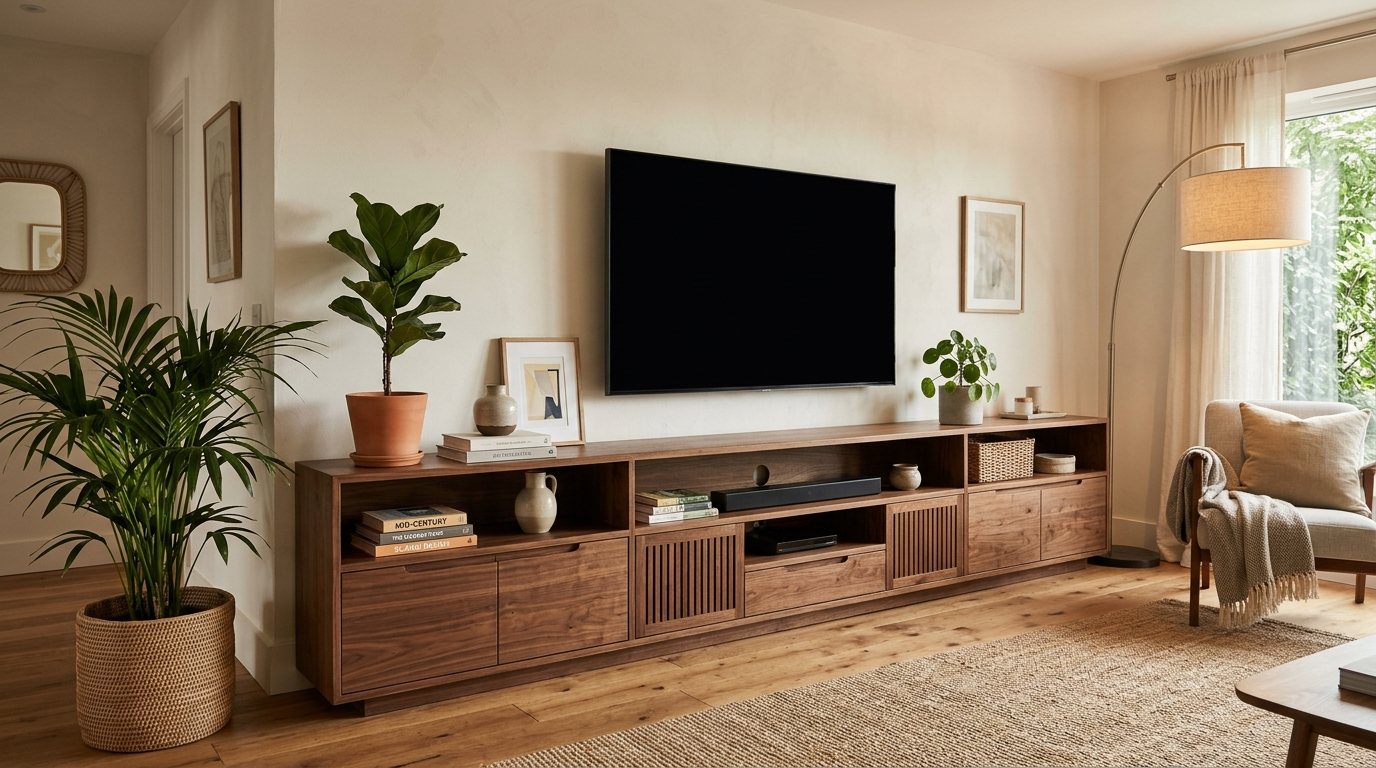
A TV stand has to carry a heavy screen, hide a tangle of cables and still fit the room. This guide explains how to choose a TV stand by matching its width to your TV, checking the viewing height, and picking storage that suits the devices you own. Take your measurements first, then browse our TV stands to compare sizes, shelves and finishes.
Match the Stand to Your TV
TV sizes are quoted on the diagonal, so the set is narrower than the number suggests. These approximate widths are a good starting point. Frames and bezels add a little, so check your model's specifications.
| TV size (diagonal) | Approximate width of the TV |
|---|---|
| 43 inch | About 38 inches (95 cm) |
| 50 inch | About 44 inches (111 cm) |
| 55 inch | About 48 inches (122 cm) |
| 65 inch | About 57 inches (145 cm) |
| 75 inch | About 65 inches (165 cm) |
| 85 inch | About 74 inches (188 cm) |
The stand should be at least as wide as the TV. A stand that is 4 to 8 inches (10 to 20 cm) wider overall looks balanced, because the screen does not appear to hang over the edge. Also check where your TV's feet sit. Some sets have feet at the outer corners and need a stand wide enough to support both, while others use a central pedestal that fits on a narrower top.
Compare the stand's stated weight capacity with your TV's weight, and add a soundbar or speakers if they will sit on top. Use any anti-tip hardware that comes with the stand and secure the TV as the maker directs, especially if children or pets share the room.
Get the Viewing Height Right
For comfortable viewing, the middle of the screen should sit close to eye level when you are seated. For most sofas that is roughly 36 to 42 inches (91 to 107 cm) from the floor. Add up the stand height, the base of the TV and half of the screen height to see where you will land. A 55-inch TV is about 27 inches (69 cm) tall, so on a 22-inch (56 cm) stand with a base of about 2 inches (5 cm), the centre of the screen sits near 37 to 38 inches (94 to 97 cm).
That is why most TV stands fall between about 18 and 26 inches (46 to 66 cm) tall. Lower stands suit big screens and low seating. Taller stands suit smaller TVs or higher seats. Avoid a setup where you tilt your head up to watch.
Plan for Cables and Airflow
Streaming boxes, game consoles and receivers give off heat, and a TV needs room behind it. A few details make a big difference:
- Cable openings: look for cutouts or an open back panel so cords pass through instead of draping over the front.
- Ventilation: keep devices on open shelves or behind panels with vents, and do not pile items on top of them.
- Distance from the wall: leave roughly 2 to 4 inches (5 to 10 cm) behind the stand for plugs and airflow, more if you use bulky right-angle plugs.
- Doors and remotes: infrared remotes need a clear line to the device. Glass doors and open shelves work, while solid doors may block the signal unless they stay open.
Choose the Right Kind of Storage
List what you want to store before you shop: consoles, cable boxes, discs, controllers, board games, baskets. Then match the storage style.
- Open shelves: easy access and good airflow, but cables and dust are on view.
- Closed cabinets: hide clutter and keep the room calm. Check that the back has ventilation.
- Drawers: useful for controllers, cables and small items that otherwise end up loose.
- Glass doors: protect equipment while keeping remotes working.
If the stand cannot hold everything, add a tall cabinet beside it rather than crowding the shelves. A small TV stand in a bedroom or condo only needs one or two shelves, and our ideas for small living rooms and condos show how to make compact pieces work.
Where to Place It: Windows, Fireplaces and Corners
- Windows: avoid putting the TV on the wall opposite a bright window, since glare washes out the picture. A side wall with curtains or blinds usually works better.
- Fireplaces: a TV above a fireplace often ends up higher than comfortable viewing height. Many people place the TV on another wall and check the TV maker's guidance on heat before mounting anything near a fire.
- Corners: a corner or narrow stand can free up floor space in a small room, but make sure everyone on the sofa can see the screen straight on.
- Mounted TVs: a low, wide console beneath a wall-mounted TV adds storage without adding height.
Think about how the TV relates to the seating as well. Our guide to living room furniture layouts that work covers viewing distance and walkways in more detail.
Frequently Asked Questions
How wide should a TV stand be for a 65-inch TV?
A 65-inch TV is roughly 57 inches (145 cm) wide, so the stand should be at least that wide. A stand around 60 to 65 inches looks balanced. Check where the TV's feet sit too, because feet at the outer corners need a top wide enough to support both.
How high should a TV stand be?
Most TV stands are between about 18 and 26 inches tall. Pick the height so the middle of the screen sits near eye level when you are seated, often around 36 to 42 inches from the floor. Large TVs suit lower stands, while smaller sets can go on taller ones.
Does a TV stand need ventilation?
Yes, devices such as consoles, receivers and streaming boxes give off heat. Choose a stand with open shelves or vented back panels, leave a few inches between the stand and the wall, and avoid stacking items on top of equipment. Check each device's manual for its own guidance.
Can I put a TV above a fireplace?
It is often not the best spot. The screen usually ends up higher than comfortable eye level, and heat from the fireplace may matter. Check both the TV maker's instructions and the fireplace guidelines, or consider a low stand on a nearby wall instead.
Compare Stands at Our Showroom
Bring your TV's width, weight and a list of the devices you plan to store, then compare shelf depth, cable openings and finishes in person at our showroom, Unit D200, 9737 Macleod Trail SW in Calgary. You can also browse the full living room collection online before you visit.





Comments
Loading comments...
Leave a comment
Your email address is never shown or shared. Comments are read by our team before they appear.